
In this article, we'll show you how to use the new Full Site Editor with The Events Calendar plugin. We've also included some workarounds.

How to build a WordPress Gutenberg Full Site Editing Starter Theme in just 10 minutes with no coding
How to Build your own WordPress Gutenberg Full Site Editor (FSE) Starter Theme in 10 minutes with no coding.
The Theme we build won't have any in-built styles but it will have all the full site editing parts.
Jamie Marsland it tutoring on using Gutenberg and FSE with focus on webshops (Woocommerce) - but gives som good hints and tricks.
On Pootlepress he writes:
Welcome to my Gutenberg Block Editor learning library. Here you'll find my growing collection of free Gutenberg tutorials.

Har man en 'gammel' Wordpress installation, hvor indlæg er skrevet med den klassiske editor, kan der være behov for konvertering til den nye blok-editor. Det kan dette plugin hjælpe med.

WordPress theme author Rich Tabor tweeted, “Even with my theme developer hat on, I’m finding it easier and easier to create block themes ~ within ~ WordPress. I’m positive one day (soon) this will be the norm.”
It looks like that day has arrived sooner than expected, as Automattic has had a team working on this capability for awhile. Today, a group of eight full-time sponsored Themes Team contributors released a plugin called Create Block Theme that can create standalone block themes and child themes inside the WordPress admin.
⚠️ Attention!
Note that the Create Block Theme plugin will write your theme.json top-level elements in alphabetical order, which may not be the order you want. This won’t break the functionality of the theme, but it may be a little confusing if, for example, you’re used to seeing the schema and version items at the top of the file.
See: A Developers Guide to Block Themes – Part 1 -> Converting the Style Guide to the theme.json file -> Exporting Styles Applied in the Global Styles Interface

It is recommended to make a test site so that you can practice using full site editing features and see all of the powerful new adjustments that you can make.
In order to enhance your learning experience, a demo WordPress site is available for you to use while you work through this content. You will have full dashboard control and the site will last for seven days before expiring.
In this article, we'll show you how to use the new Full Site Editor with The Events Calendar plugin. We've also included some workarounds.
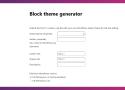
Generate a .zip file with your own starter theme for full site editing. Enter the theme name and author name and select your features.
Then you'll get a basis theme to work with
Full site editing will change how everyone uses themes,-and how we build them.
What is full site editing?
Full site editing is a set of new WordPress features:
Block themes, template editing, site blocks, and global styles.
Block themes
With block themes, you use blocks to create entire pages or websites.
Everything you see on a page is a block.

WordPress 5.9 is set to launch on January 25, and many users will be in for a surprise. The upcoming release will be the most monumental shift in how the platform works since the introduction of th…
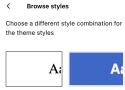
In Block Themes, you can customize the Styles to reflect your preferred typography, colors, and more for your entire site, or to override just a few blocks.