
How to Build Incredible WordPress Blocks with AI — Featuring Nick Diego and Ryan Welcher
Join WordPress experts Nick Diego and Ryan Welcher as they explore the power of AI in crafting exceptional WordPress blocks.
In this session, you'll discover practical techniques, pro tips, and AI-driven tools to enhance your block-building skills and streamline workflows.
Whether you're a developer or looking to expand your WordPress expertise, this is your chance to unlock new possibilities for your WordPress site!

Most great-looking websites utilize some sort of grid pattern in their page layout. But while many designers accomplish this using CSS Grid, new WordPress blocks let you do it right in the editor.
In today’s “Build and Beyond” video, Jamie Marsland shows you how to use Grid and Grid Layout blocks to create a beautiful, functional WordPress site.
At the moment you'll need Gutenberg plugin, for the Grid-block. See also how Jamie makes it really responsible. Needs some settings.
Do you want to create a custom Gutenberg block for your WordPress website?
While WordPress comes with a lot of basic blocks for creating content, you might need something more custom for your website.
This is a short tutorial for the "Block Designer" plugin for WordPress.
You can make your own blocks by using the Block Designer plugin.

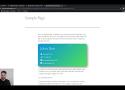
Jamie Marsland gives here a hint about adding background image to columns, with this CSS code.
But actually he then shows an even smarter way in his YouTube instruction where he first tells about this trick but when he comes to Putting it all together do it in a smarter way.
As he demonstrates it's possible to achieve the same with the Cover-block. Of course if you need to repeat the same background several times, the CSS-class solution can be more handy.
Really like a WordPress site? See how they built it with Detective Wapuu.
What Detective Wapuu does is it scans the site you are currently on and let's you know which blocks they are using and where. Not only can you discover new blocks but you can get ideas on how to put blocks together in new and interesting ways.

Events Calendar Pro ships with a number of cool widget shortcodes that you can use on your site in locations other than a sidebar.
On the road to FSE...
As mentioned, you won’t yet see Events widgets in the widget admin. However, with Events Calendar Pro users can get around that by using our widget shortcodes with the Shortcode block.
In this article, we'll show you how to use the new Full Site Editor with The Events Calendar plugin. We've also included some workarounds.
Full site editing will change how everyone uses themes,-and how we build them.
What is full site editing?
Full site editing is a set of new WordPress features:
Block themes, template editing, site blocks, and global styles.
Block themes
With block themes, you use blocks to create entire pages or websites.
Everything you see on a page is a block.
Bare tast lorem i et tomt blok afsnit og tryk på retur tasten på dit tastaturet.
At skrive lorem vil automatisk fuldføre sætningen.

Add scroll-based animations to WordPress (Gutenberg) blocks.
See how it works: video demo
The Gutenberg Sticky Block can be added to any Post or Page and will be sticky as soon as it hits the top of the page after you scroll down. The Sticky Block can contain any other Blocks (Paragraphs, Images, etc.), and can also be used in other Blocks (e.g. Column or Table).
Jamie Marsland makes at short presentation here: 5 Quick and Easy Ways to Make Your WordPress Content Better. For instance how to use the Pushup Element
Create your WordPress sliders in seconds.
Gutenslider is a slider block for Gutenberg that lets you create WordPress Image Sliders and Video Sliders without leaving Gutenberg editor you already know.
You can add any block on top.
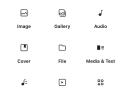
There are many different block types available. Here is a list of the blocks that are available.
In this guide, we'll cover everything you need to know about WordPress block patterns, including how to use block patterns to their full potential, as well as how to build custom block patterns.
-ckn- : Ja, der er faktisk meget at lære om Blokgrupper og hvordan man kan lave sine egne. F.eks. i et child-theme.
With the More block you can truncate your blog entries to only show the first part of a post is displayed on homepage, archive pages and in subscriber emails.

Getwid is a collection of 40+ Gutenberg blocks that greatly extends the library of existing core WordPress blocks and 35+ unique pre-made block templates for the Block Editor.
Kori Ashton introduce the Getwid plugin in her "40+ Free Blocks for Gutenberg in WordPress - GetWid" presentation.
In this tutorial, you will learn how to make any page layout using the WordPress block builder Gutenberg.
If you are coming from any other page builder such as Elementor, Beaver Builder, Divi, etc, this is a must-watch video.

Custom Blocks for for Gutenberg to help extend the editing capabilities.
Don't forget to watch the Video Tutorial.