Here's an overview of How to setup Menus in WordPress.
Unfortunately this guide do not show how to make multiple menus.

Brian Coords is a WordPress developer, educator and host of the Webmasters podcast.
Among other things, he has published a series on “7 Tools for Modern WordPress Development”.

A WordPress.com offer...
In this step-by-step tutorial, we’ll show you how to build a complete website with the AI Website Builder on WordPress.com.
You’ll see how AI can generate layouts, colors, fonts, and sections in minutes, while also learning how to fine-tune your site manually – whether that means swapping images, adjusting text, or reorganizing blocks. From a travel blog to a small business site, a non-profit project, a restaurant site, or even a photography portfolio, this walkthrough covers both the automation and the hands-on control you need to create a site that feels truly yours.
There's also AI possibilities in Studio by WordPress.com
A fast, free, open source tool for local WordPress development all powered by WordPress Playground and WordPress.com.
See the Quick Start Guide that also has a video guide.

Learn how to set up a WordPress website in under 250 seconds with this quick start guide!
This beginners tutorial covers the three essential aspects of creating a WordPress site: content, structure, and design.
Follow along as we demonstrate how to:
- Create and organize pages
- Set up navigation menus
- Configure homepage and blog settings
- Add content using theme patterns
- Customize the design with global styles

WordPress 6.5 released
This guide outlines major developer features and breaking changes in 6.5 and is published in the Release Candidate cycle to help inform WordPress extending developers, Core developers, and others.
One new feature in 6.5 is the ability to install costum fonts. Demonstrated by Dave Smith in his video: CUSTOM FONTS finally unlock creative freedom in the WORDPRESS 6.5 Font Library
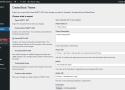
The Create Block Theme plugin has been a go-to-feature for the creation of block themes, akin to a Swiss knife. This tutorial walks block theme developers through how to use the plugin and integrat…
In this step-by-step tutorial, learn how to use Git and GitHub for source control management (SCM). We start with Git. What is it? How you can get it running on your system, and how you can start working with it? Then we look at GitHub.com, a platform for hosting and collaborating on Git repositories. By the end of this video, you'll be well on your way to using Git and GitHub. If you'd like to follow along, I've included sample files down below.

W3Schools offers free online tutorials, references and exercises in all the major languages of the web. Covering popular subjects like HTML, CSS, JavaScript, Python, SQL, Java, and many, many more.
Resources for Developers, by Developers
MDN Web Docs is an open-source, collaborative project documenting Web platform technologies, including CSS, HTML, JavaScript, and Web APIs. We also provide an extensive set of learning resources for beginning developers and students.
To set up your development environment can be a hassle - especially if you try to do it en a MS Windows environment !
In the Introduction to Block Development: Build your first custom block, there is a guide to Set up your development environment.
You'll need the node/npm installed! But in the Set up your development environment, there's not any direct description on how to do this on Windows.
The guide recommends using NVM (Node Version Manager) to handle different versions of Node. Unfortunately, NVM is mostly supported on Linux and Mac (Uses POSIX-compliant shell). It should work through WSL (Windows Subsystem for Linux) depending on the version of WSL.
This tutorial shows a WordPress recommended way !
The way recommended here:
If you’re on a Windows machine, you will need to install the Chocolatey package manager for Windows to install nvm. First open PowerShell with administrative privileges by right-clicking on the PowerShell menu item and selecting Run as Administrator. Then browse to the Chocolatey setup documentation and scroll down to the Install with PowerShell instructions. Copy the instructions and right-click in the PowerShell window to paste them.
See the Video or read the Video Transcript to learn more.
This guide is for setting up your local environment for JavaScript development for creating plugins and tools to extend WordPress and the block editor.
In the course: Introduction to Block Development: Build your first custom block the 2nd lesson Set up your development environment
gives also recommendations for choise of IDE.
A development environment is a catch-all term for what you need setup on your computer to work.
This guide for setting up the local environment is based on Ubuntu and using the curl command.
Good to know:
cURL (Client URL) comes pre-installed on Windows and macOS — otherwise, you can download the package from the cURL website.
Microsoft ships curl too
Curl is also shipped by Microsoft as part of Windows 10 and 11.

How to build a WordPress Gutenberg Full Site Editing Starter Theme in just 10 minutes with no coding
How to Build your own WordPress Gutenberg Full Site Editor (FSE) Starter Theme in 10 minutes with no coding.
The Theme we build won't have any in-built styles but it will have all the full site editing parts.
Jamie Marsland it tutoring on using Gutenberg and FSE with focus on webshops (Woocommerce) - but gives som good hints and tricks.
On Pootlepress he writes:
Welcome to my Gutenberg Block Editor learning library. Here you'll find my growing collection of free Gutenberg tutorials.
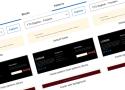
Block patterns, also frequently referred to as sections, were introduced in WordPress 5.5 to allow users to build and share predefined block layouts in the pattern directory. The directory is the home of a wide range of curated patterns designed by the WordPress community. These patterns are available in simple copy and paste format, require no coding knowledge and thus are a big time saver for users.
Despite many articles on patterns, there is a lack of comprehensive and up-to-date articles on pattern creation covering the latest enhanced features. This article aims to fill the gap with a focus on the recent enhanced features like creating patterns without registration and offer an up-to-date step-by-step guide to create and use them in block themes for novices and experienced authors.
Full site editing will change how everyone uses themes,-and how we build them.
What is full site editing?
Full site editing is a set of new WordPress features:
Block themes, template editing, site blocks, and global styles.
Block themes
With block themes, you use blocks to create entire pages or websites.
Everything you see on a page is a block.
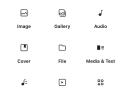
There are many different block types available. Here is a list of the blocks that are available.
Her er WordPress' egen anvisning til at flytte et websted.

Like we do with typography, accessibility, and JavaScript, I’m hoping to occasionally drop packs of links things I find particularly interesting in that ecosystem.
This time:
- Advanced Custom Fields: A Guide to Custom Fields and ACF Blocks
- Make Unique Designs by Combining Blocks
- WP Engine Makes Local Pro Free for All Users
- Simpler Block Spacing in WordPress with :is() and :where()
- Faust.js, the Framework For Headless WordPress
- Proposal for a Performance team
- Theme.json for WordPress Block Themes explained
- Query Loop: The Ins and Outs of One of WordPress 5.8’s Most Powerful Features
- Encute

Congratulations on picking up the Filter Bar add on! You’re probably excited to unleash your new calendar filtering powers, so let’s go over the ways you can configure the plugin to suit your needs. Finding the filter settings The first thing you’ll want to do is head over to the Filter Bar settings, which you […]
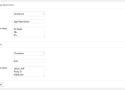
Beskrivelse af hvordan man selv sætter felter op. F.eks. hvis man vil angive et felt med prædikant til gudstjeneste