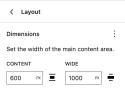
The Stylespanel in WordPress 5.9 or higher allows you to set the overall aesthetics and layout of your site at a global level.
Styles is a new feature that allows you to set the overall aesthetics and layout of your site at a global level, instead of editing individual blocks or pages.
You can set the colors, typography, layout, spacing, and more, for the entire site and give your website a cohesive look that shows off your brand.
You can also edit the default appearance of blocks to streamline the look and feel of your website — add your unique colors to create a branded Button block, or adjust the Heading block to your preferred font size.
Here's WordPress Documentation

Craig Buckler reviews the art of creating printer-friendly web pages with CSS, showing how to retrofit them to any site, at minimal cost, without affecting or breaking existing functionality — delighting users and raising your site above competitor sites.
This guide explains how to use the Additional CSS Classes feature of the WordPress editor.
Der kan tilføjes content til et element med denne