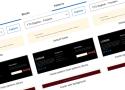
Block patterns, also frequently referred to as sections, were introduced in WordPress 5.5 to allow users to build and share predefined block layouts in the pattern directory. The directory is the home of a wide range of curated patterns designed by the WordPress community. These patterns are available in simple copy and paste format, require no coding knowledge and thus are a big time saver for users.
Despite many articles on patterns, there is a lack of comprehensive and up-to-date articles on pattern creation covering the latest enhanced features. This article aims to fill the gap with a focus on the recent enhanced features like creating patterns without registration and offer an up-to-date step-by-step guide to create and use them in block themes for novices and experienced authors.
In this article, we'll show you how to disable links for single events on the main calendar page, using a CSS snippet.
This might come up if you’d like to create a holiday event or blackout dates

Events Calendar Pro ships with a number of cool widget shortcodes that you can use on your site in locations other than a sidebar.
On the road to FSE...
As mentioned, you won’t yet see Events widgets in the widget admin. However, with Events Calendar Pro users can get around that by using our widget shortcodes with the Shortcode block.
In this article, we'll show you how to use the new Full Site Editor with The Events Calendar plugin. We've also included some workarounds.
Gutenberg version 12.8 adds the first version of a new web fonts API.
The web fonts API supports using local font files that you place in the theme folder.
OBS!
Problems with GDPR makes it difficult to use in WP. See: https://wptavern.com/the-wordpress-web-fonts-api-has-arrived
Defaulting to the system font of a particular operating system can boost performance because the browser doesn't have to download any font files, it’s using one it already had.
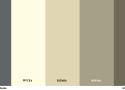
Baggrundsfarven for Havrebjerg.dk er Hex:234c00
Den blev i sin tid valgt for at være havre- og naturrelateret. Og samtidig forholdsvis klassisk, nærmest 'vogngrøn'.
Farvepaletten, der blev brugt til WP temaet "Twenty Fourteen" blev genereret ved hjælp af "Fourteen Colors" plugin, der ud fra baggrunds-, accent-, og Contrastfarve, genererede paletten. (Det blev kun benyttet 2 farver. Contrast- og baggrundsfarve blev valgt til samme.)
Accent farve var valgt til Hex:336d00
The good news is that there’s a simple, straightforward way to create a custom RSVP website using WordPress and the Event Tickets Plugin.
-ckn- : Her er en beskrivelse af, hvordan man kan opsætte en tilmeldingsformular på websted. Uden de helt store dikkedarer.
Ved hjælp af Event Tickets plugin fra The Events Calendar kan der opsættes en tilmeldingsformular.
Den er i øvrigt ikke afhængig af brug af kalender.

Overview of Visual Studio Code
It can be difficult to remember the theme.json settings and properties while you develop, so a JSON scheme was created to help. The schema is available at https://schemas.wp.org/trunk/theme.json
Code editors can pick up the schema and can provide help like tooltips, autocomplete, or schema validation in the editor. To use the schema in Visual Studio Code, add "$schema": "https://schemas.wp.org/trunk/theme.json" to the beginning of your theme.json file.
Sarah Snow has made this tutorial on Using Schema with WordPress Theme.json
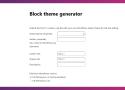
Generate a .zip file with your own starter theme for full site editing. Enter the theme name and author name and select your features.
Then you'll get a basis theme to work with
Havde et uheld med MariaDB :
[ERROR] mysqld.exe: Aria recovery failed. Please run aria_chk -r on all Aria tables and delete all aria_log.######## files [ERROR] Plugin 'Aria' init function returned error. [ERROR] Plugin 'Aria' registration as a STORAGE ENGINE failed.
Blev løst ved at fra XAMPP CLI at køre:
../bin/aria_chk -r mysql/*.mai
Husk at slette logfiler efterfølgende - og læs evt. hele tråden....
CASE: En forening har behov for at få vist en besked på deres websted med ujævne mellemrum, det kan være om banerne i tennisklubben eller på golfbanen er åbne.
Her er tale om en beskrivelse af at sende e-mail til en WP installation, som automagisk publiceres.
Fik den idé, at du kunne være værd at undersøge, om nyhedsbreve evt. kan autopubliceres ved at der sendes til speciel mail-adresse.
Værd at undersøge nærmere...
Ordsammensætningsudfordringer !
På dansk bruger vi sammensatte ord - det er en udfordring ved stor skrift eller smalle spalter, især uden orddeling. Men der findes et trick...
Der kan anvendes <wbr> - wordbreak tag, der dog ofte deler ordet i to ved opslag/søgning.
Mest brugbar er : ­ - 'softhyphen' der er en blød bindestreg, som angiver ordets deling.1
<h1> Ord­sam­men­sæt­nings­ud­for­dring­er </h1>
På MS Windows maskiner, kan denne bløde bindestreg indsættes med genvejstasten: Alt+Ctrl+- - sidste tegn er almindelig bindestreg.
- ISO 8859:
0xAD - Unicode:
U+00AD - MS Word:
Alt+0173 - HTML:
­eller­
⚠️OBS: Med denne metode, sker der ikke umiddelbart noget ved indsætning, da dette tegn bruges til at indikere et potentielt ombrydningssted i et ord, men vises kun, hvis ordet bliver delt over en ny linje.
-
Vær opmærksom på at ved redigering af indlæg - som f.eks. her med Markdovn syntaks - konverteres
&- ampersand til tegnet & - og må igen skrive ind i 'koden' ↩

Her er anmeldelse af et 'simpelt' Carousel Slider Block for Gutenberg plugin.
.... more to follow..
Værd at tjekke ud...
Metodistkirken.dk har et problem med et felt, der ikke vises på Windows systemer - uanset browser.
Jeg har beskrevet problemet i en lille video her
Som jeg kommer ind på i videoen, ser det ud til at være problem med en animation, der ikke kører korrekt.
Webstedet benytter temaet Enfold, der giver denne dokumentation til deres animerings features.
Beautiful, free images and photos that you can download and use for any project. Better than any royalty free or stock photos.
Full site editing will change how everyone uses themes,-and how we build them.
What is full site editing?
Full site editing is a set of new WordPress features:
Block themes, template editing, site blocks, and global styles.
Block themes
With block themes, you use blocks to create entire pages or websites.
Everything you see on a page is a block.
Bare tast lorem i et tomt blok afsnit og tryk på retur tasten på dit tastaturet.
At skrive lorem vil automatisk fuldføre sætningen.

Add scroll-based animations to WordPress (Gutenberg) blocks.
See how it works: video demo