WordPress‘s default behavior when pasting a link in its editing interface (since the Gutenberg editor) is that it tries to create an embed block to show a link preview. But this only works when the page you link to has the correct <oembed> properties set.

FontPark.com has the largest archive of free fonts on the Internet. You can find fonts for commercial and noncommercial applications for Windows, Mac OS and Linux. And for local hosting a webfont

Speed up your design process! Try fonts discovered on websites directly in any design software.
Font Face Ninja offers Chrome and Safari browser extensions that let you discover the fonts used on websites.
Endnu en sandbox til udvikling af tema.
Wordpress 6.1 "Misha" er landet.
Opkaldt efter og inspireret af den Ukrainsk-Norske jazz pianist Mikhail “Misha” Alperin.
W3Techs provides information about the usage of various types of technologies on the web.
Så kom Wp6.1 og denne sandbox er fra 021122
Jamie Marsland beskriver dette plugin i sin: "5 Quick and Easy Ways to Make Your WordPress Content Better"
Skal måske lige prøves af på Blocks
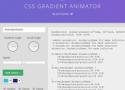
A CSS generator to create beautiful animated gradients for use on your website.
In the Gutenberg Tutorial - How to add a animated gradient colour background section to wordpress Jamie Marsland explains how to use it in WordPress

5 tips to make your WordPress Gutenberg designs less boxy.
- Add beautiful shapes into pages
- Create stylish galleries
- Add seamless Photo cut outs
- Improve readability with snazzy sticky backgrounds
- Mirror text with shape design

Jamie Marsland gives here a hint about adding background image to columns, with this CSS code.
But actually he then shows an even smarter way in his YouTube instruction where he first tells about this trick but when he comes to Putting it all together do it in a smarter way.
As he demonstrates it's possible to achieve the same with the Cover-block. Of course if you need to repeat the same background several times, the CSS-class solution can be more handy.
In his Create Pro WordPress Page Layouts in Just 10 Minutes, Jamie Marsland gives a hint how you can reverse order of columns on mobile.
The link here is the code - explanation to his youtube video.
-ckn- : Jamies solution works by reversing the order. What if you want to have the middle column to be the first ?
I asked ChatGPT - and found a solution, that I will write about, when I find time.

Fluid typography is a fancy way of “describing font properties, such as size or line height, that scale fluidly according to the size of the viewport”. It’s also known by other names, like responsive typography, flexible type, fluid type, viewport sized typography, fluid typography, and even responsive display text.

WordPress and Bootstrap are both popular platforms for web design that aren’t often considered as compatible. Bootstrap has grown to be a favorite CSS platform for developers because it makes it easy to build responsive websites. In fact, more than 70% of websites on the internet are designed with it. You can code anything you’d like into its responsive framework to create a unique website that’s mobile friendly, right out of the box. With more than half of all users accessing the internet via a mobile device, it’s crucial to have a responsive site.
What if we told you that you can use Bootstrap and WordPress together? Well, you can. There are a few ways to use Bootstrap in WordPress, including WordPress Bootstrap plugins which can add Bootstraps blocks to the WordPress Editor. We’re going to cover all the ways to use Bootstrap in WordPress and show you how.
Så er vi nået en uge længere frem - og har brug for et nyt login...
Der arbejdes stadig med udvikling...
Share your stream.
Videos, photos, music, links and docs - instantly and easily
Really like a WordPress site? See how they built it with Detective Wapuu.
What Detective Wapuu does is it scans the site you are currently on and let's you know which blocks they are using and where. Not only can you discover new blocks but you can get ideas on how to put blocks together in new and interesting ways.
Advanced Eyedropper, Color Picker, Gradient Generator and other colorful goodies

The Test Data Generator extension adds a new settings screen in Events > Test Data that provides an automated tool to generate high quality, life-like data for The Events Calendar family of plugins.